
 United States
 Canada
 United Kingdom
 Australia
 New Zealand
How to Use PrintCalendar365
Follow the screenshots to download and print a calendar, make your own design, fill in a planner online or save a date.
Find a Calendar for Your Country
- Open Printable Calendars and select your Country and Year.
- Choose a month for a single-month sheet or select Full year to see annual layouts.
- Select Open Calendar to see the available designs for that period.

Download a Calendar Template
- Select a template’s image to open a larger preview. Check the paper size, orientation and first day of the week on the template card.
- Choose PDF to save a ready-to-print copy. If the file opens in your browser, use its download button to save it.
- Print the design as shown.
- Image
- Save an image to share or add to a document.
- Word
- Open the layout in a word processor.
- Excel
- Work with dates in a spreadsheet.
The buttons on each design show which formats are available for it.
Browse 2027 US Templates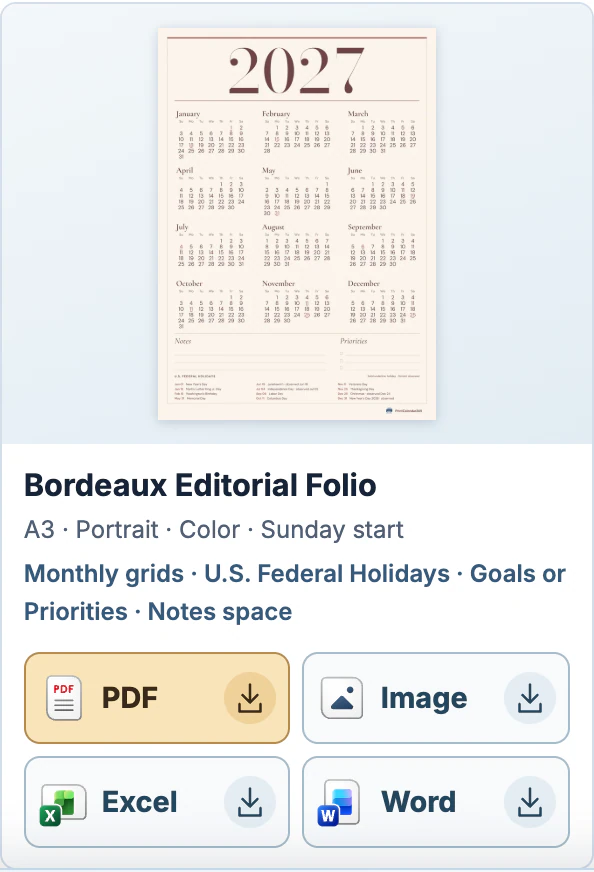
Print at the Right Paper Size
- For an undated sheet, open Blank Calendar. Pick A4, A3 or US Letter and choose a Sunday or Monday start.
- Select Print Calendar, or open your downloaded PDF and choose Print in your PDF viewer.
- Match the paper size and portrait or landscape orientation to the template. Use Actual Size or 100% to keep the layout at its original size. If your printer cuts off the edges, use Fit and check the preview before printing.

Make a Calendar With Your Own Dates and Photos
- Pick a starting design in Templates. Open Dates to choose a month, full year or undated layout. Set the country, week start and holidays there when available.
- Set the paper size and orientation in Layout. Use Text for a title or page notes, Photos for a picture and Notes for entries on specific dates.
- Check the preview, then open Download and select a format. Choose PDF for a print-ready copy of your calendar.

Fill In a Planner Online Before You Print
- In the Weekly Planner, set the week in Plan Settings. Select Apply Settings after changing the dates.
- Select Add to Week, choose a day and enter the item. Select Save Entry to place it in your plan.
- Open Preview. If there’s more than one sheet, use the page selector to check each one.
- Choose Download PDF to save your filled-in plan or Print Planner to print it. More Formats shows the other export options. Printing and downloading include every sheet.

Add a Holiday to Your Calendar or Save a Note
- Find the date in Public Holidays for your country. On the holiday’s page, check whether the date is the holiday itself or the day it’s observed.
- Expand Add to Calendar for the date you want. Choose Google Calendar to open the event there, or download the .ics file and open it in a compatible calendar app.
- To keep the holiday on your PrintCalendar365 calendar, choose Save to My Notes. For your own note, open a date on the home calendar, enter the note and select Save Note. Use the My Notes filter to find it again in the same browser.
